Can a Krushi Seva Kendra run Kroply in Marathi or Hindi?
Kroply offers English, Hindi, Marathi, Bengali, Telugu, Tamil, Gujarati, Kannada, Odia and Malayalam interfaces. Customer support language availability should be confirmed when booking a demo.
Managing a Krushi Seva Kendra or Khad Beej shop digitally connects incoming supplier purchases, fertilizer and pesticide batch stock, counter GST billing and seasonal farmer udhari in one shared system. Staff can work in Marathi, Hindi, English or seven other Indian languages on web and Android.
A Krushi Seva Kendra sells 50 kg Urea or DAP bags alongside litre bottles, gram sachets and certified seed packets. Set up each product with its pack size, split-loose rules, HSN code, configured GST rate, batch number and expiry date before taking opening stock.
During peak Kharif and Rabi arrivals, upload a photo or PDF of your wholesaler bill. Kroply extracts supplier details, items, batches, rates and taxes into a draft purchase. Compare every line with the original bill and save once to update godown stock and supplier balances.
Select the farmer account, scan a product QR or pick items by name or technical composition, verify configured GST, and record cash, UPI or part-paid credit. Print thermal or A4 bills or share the reviewed invoice summary through WhatsApp.
Keep every credit bill and harvest-time repayment against the same farmer ledger so outstanding balances remain explainable. When stock moves between your main counter and remote godown, record a godown transfer and verify physical bag counts periodically.
Kroply offers English, Hindi, Marathi, Bengali, Telugu, Tamil, Gujarati, Kannada, Odia and Malayalam interfaces. Customer support language availability should be confirmed when booking a demo.
Reconcile opening stock per godown, verify unpaid farmer credit and supplier balances, test a sample supplier invoice OCR draft and print one GST bill on your counter printer before switching daily work.
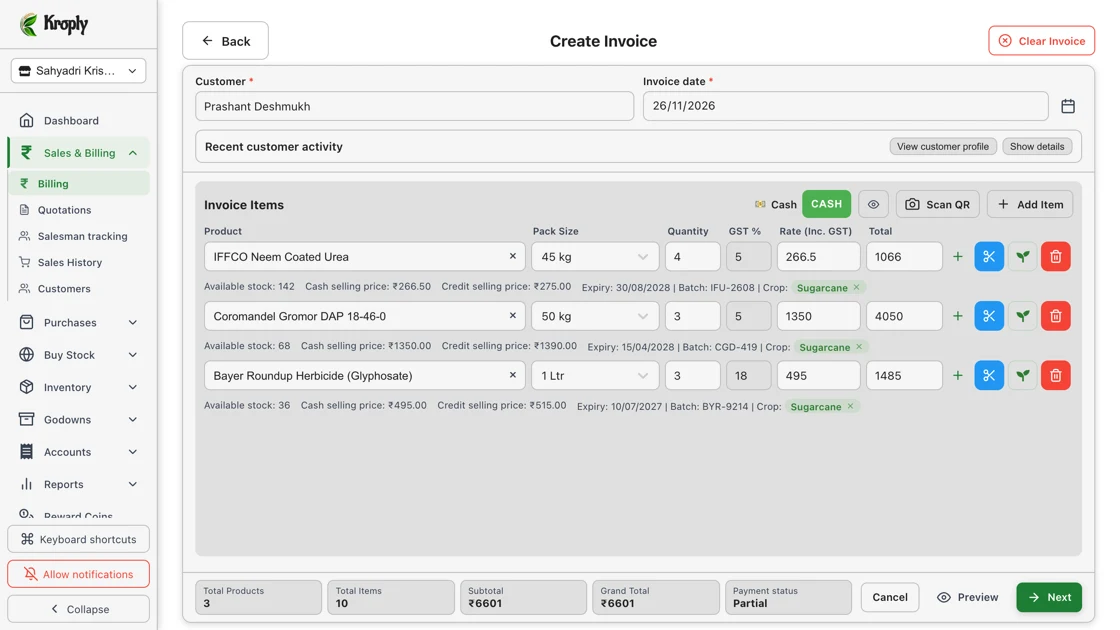
Video demonstration: Watch counter billing walkthrough (6:43) · See all English, Hindi & Marathi walkthrough chapters
“Easy to use for everyday billing. Preparing bills takes less time, which makes daily shop work simpler.”
Kroply connects purchases, batch stock, godown transfers, GST invoices and farmer credit across 10 Indian languages including Marathi and Hindi on web and Android.
Reconcile opening stock, verify supplier OCR drafts line-by-line before saving, and test counter printing during your demo.